

Pendle liquidity transfer walkthrough
This guide helps existing Pendle liquidity providers understand how to transfer their positions to infiniFi.Overview
infiniFi integrates with Pendle as one of its illiquid farm strategies. If you’re currently providing liquidity on Pendle, you can migrate your position to infiniFi to benefit from the fractional reserve amplification.Resources
Pendle LPers Rollover Guide
Detailed guide for rolling over Pendle LP positions
Video Tutorial
Coming soon - video walkthrough of the migration process
Key Concepts
Why Migrate?
infiniFi’s fractional reserve system allows your Pendle position to earn amplified returns by:- Combining your illiquid position with liquid deposits
- Applying duration-matching to maximize capital efficiency
- Distributing returns according to a time-weighted multiplier
Duration Matching
When you lock iUSD for a specific unbonding period that matches Pendle’s maturity timeline, you help infiniFi efficiently ladder its balance sheet while earning premium returns.View Whitepaper
Learn more about duration matching and fractional reserve mechanics.
Step-by-step migration process
Before you start
The new iUSD Pendle market offers better efficiency and opportunities for LPers. If you originally used Keep YT mode, this transfer should result in little to no slippage. Enable Keep YT mode for the target pool before you begin.1. Access the old iUSD market
Open the old iUSD Pendle market.2. Use Pendle’s transfer feature
Use Pendle’s built-in transfer liquidity feature instead of manually selling and rebuying your position. Why transfer instead of selling manually?- Price-impact-free YT and PT redemption
- Capital-efficient handling of the remaining position at the current market rate
- No need to sell YT upfront
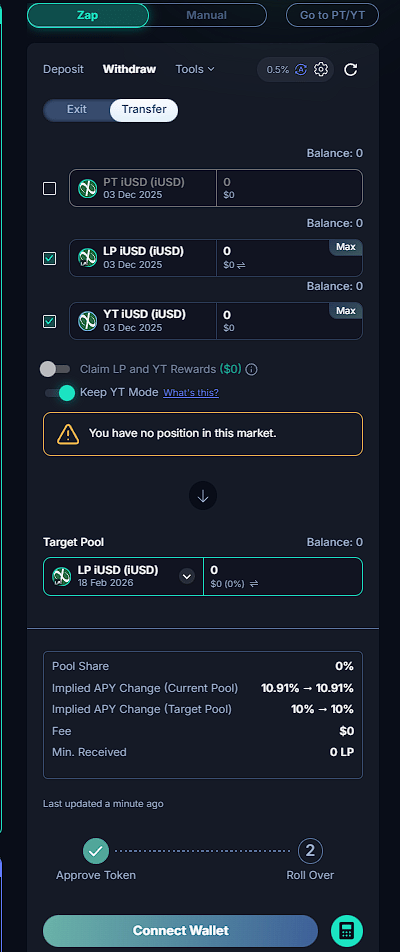
3. Configure the transfer
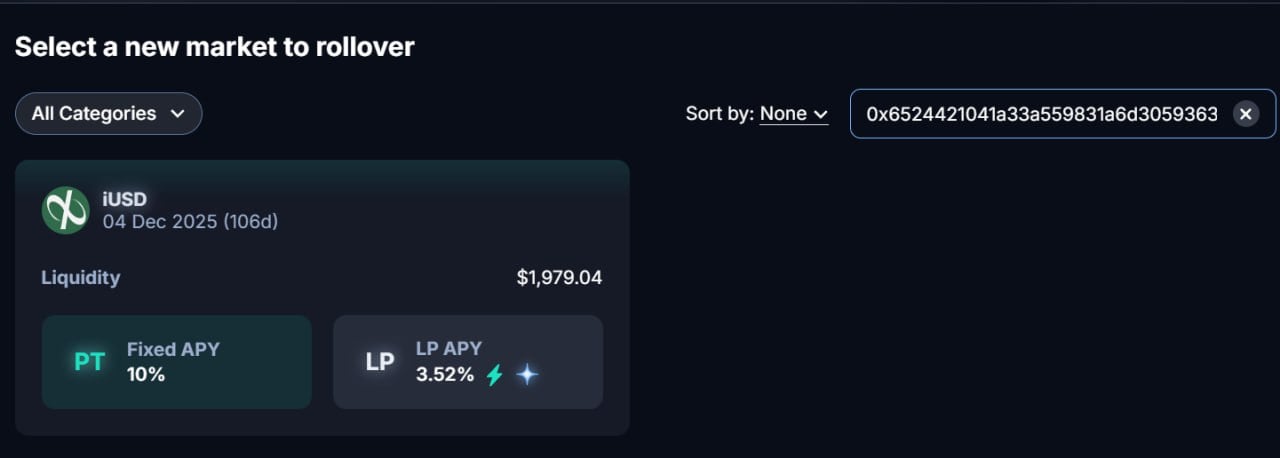
Set both the YT and LP positions to transfer. Select the target pool and enter0x3d39e4d42b3f6b493ee52ad5a0d8cb222f03f152. Then enable Keep YT mode to reduce price impact in the target pool.

4. View your position in the new iUSD market
Open the new iUSD Pendle market to view your transferred position.For large LP positions
- This is especially important for positions that initially used Keep YT mode.
- The transfer feature handles the migration automatically.
- You do not need to sell the YT portion beforehand.
What happens during the transfer
- Pendle automatically redeems YT and PT without price impact.
- It handles the remaining position at the current market rate.
- It redeploys your position into the target pool.
- Keep YT mode maintains your yield strategy.
Technical notes
- Network: Ethereum mainnet
- Gas optimization: The transfer is bundled into one transaction.
- Slippage protection: Pendle builds it into the transfer flow.
- Position continuity: Keep YT mode maintains your LP strategy and helps prevent large impacts on IY.